
Rate: Home, Finance & Wellness
Guaranteed Rate, IncFinance
4.5239.00 Reviews
- Version
- 1.52-prod
- Installs
- 500.00K
- Age Rating
- Everyone
Screenshots


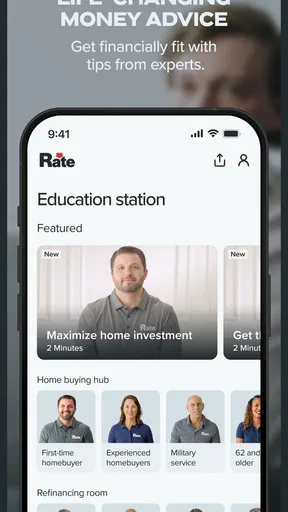
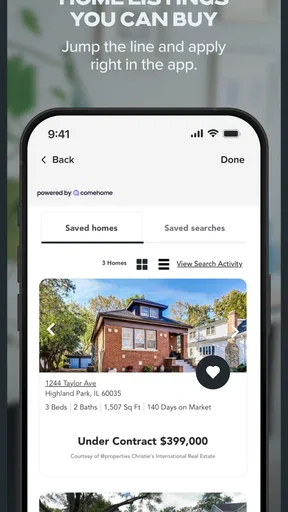
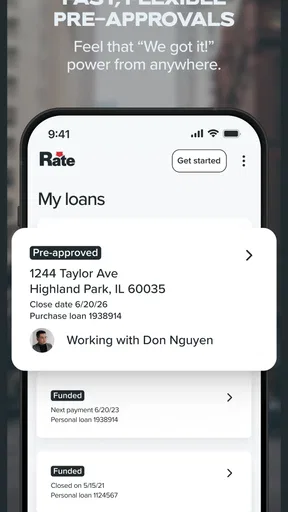



Our Review of Rate: Home, Finance & Wellness
 Analysis by Appyee
Choosing a finance app can feel more serious than choosing an ordinary utility, especially when the app may lead you toward a mortgage, refinancing, an auto loan, home equity borrowing, or a personal loan. My first impression of Rate: Home, Finance & Wellness is that it tries to bring several parts of that decision into one place rather than treating lending as a single-purpose task. It is a free finance app from Guaranteed Rate, Inc, and its wider scope also reaches travel and wellness.
I would describe it as a starting point for people who want to explore financial options without immediately committing to a particular loan product. That distinction matters. This is not an app I would use as a replacement for carefully reading loan documents, comparing formal offers, or speaking with a qualified adviser when the decision is complicated. I see it more as a convenient first stop: a place to organize your thoughts, investigate possible directions, and decide what deserves closer attention.
The app has a 4.5 average from around two thousand ratings and has passed half a million installs, which suggests that it has found a meaningful audience. It is rated for Everyone, so its presentation is intended to be broadly accessible. The current Android release is version 1.52-prod, and it works on Android 7.0 or later. Those details make it practical for people using older Android phones, although the experience will naturally depend on the condition and performance of the individual device.
What to expect before you begin
The first thing I would tell a new user is not to expect a traditional banking dashboard filled with account balances and transaction history. The focus here is different. The app brings together borrowing topics such as mortgages, refinancing, auto finance, home equity, and personal loans, while also including travel and wellness content. That combination makes it feel more like a broader financial companion than a narrow calculator or payment tracker.
That breadth is useful when your situation is still taking shape. For example, someone considering a move may be weighing a new mortgage against keeping an existing home and exploring home equity. Someone dealing with a large repair may be comparing a personal loan with another way to cover the expense. Having related subjects in one app can help you frame the question before you start contacting lenders.
At the same time, the range can create a little uncertainty about where to begin. A first-time user may arrive expecting one obvious action, but the right path depends on the goal. I recommend deciding what you want to accomplish before opening the app: understand a mortgage route, investigate refinancing, think through an auto purchase, or simply browse the broader home and financial material. A clear purpose makes the app feel less scattered.
The travel and wellness areas are also worth viewing as supporting content rather than assuming they are central financial tools. Their presence may appeal to someone who wants a wider lifestyle-oriented experience, but a user looking only for budgeting, spending categorization, or everyday banking may find the app is not aimed at that need. In that case, a dedicated budgeting application or your bank’s own mobile app would likely be a better fit.
Because Guaranteed Rate, Inc is the developer, the app naturally has a connection to the company’s lending focus. That can be helpful if your questions are already related to home finance. It also means I would keep my expectations realistic: an app associated with a lending provider is not the same thing as an independent marketplace that puts every possible lender side by side. If impartial comparison across many providers is your main goal, another type of service may suit you better.
How I would approach the first session
I would start by browsing rather than rushing into a serious application. Look at the section that matches your immediate goal, note the terms and questions that come up, and write down anything you need to verify elsewhere. This simple habit prevents a common mistake: treating an exploratory screen as though it were a final approval or a complete financial recommendation.
For a first-time homebuyer, the useful outcome of the opening session may be a clearer vocabulary. You might finish knowing whether your next question concerns a mortgage, refinancing, or home equity instead of vaguely searching for “home money.” For an existing homeowner, the value may be recognizing that lowering a payment, accessing equity, and changing the structure of a loan are separate decisions with different consequences.
I also suggest keeping personal information organized before you start any serious process. Have a rough picture of your income, recurring obligations, desired purchase, and time frame in mind. I would not guess at figures simply to move through a screen. Accurate information gives you a more useful result and makes it easier to compare what you see in the app with paperwork or conversations outside it.
Setting up a useful starting point
Installation is straightforward for Android users whose phones meet the minimum operating-system requirement. Since the app is free, there is no purchase decision before trying it. I would still approach setup with the same care I use for any finance product: read each screen, understand what action it is asking me to take, and avoid entering details that are unrelated to the question I am trying to answer.
The most important setup step is mental rather than technical. Pick one immediate objective. If you are shopping for a vehicle, begin with the auto-loan path. If you are thinking about changing an existing home loan, start with refinancing rather than mixing it with a new-purchase search. This keeps your first session focused and makes it easier to tell whether the app is actually helping.
For someone who is nervous about financial apps, I would recommend treating the first visit as an orientation. Explore the wording, identify the available route, and pause whenever a question is unclear. There is no advantage in moving quickly through a borrowing workflow if you do not understand what the information means. A calm, deliberate first session is more valuable than a fast but confusing one.
One practical tip is to separate “information gathering” from “decision making.” During setup, collect questions such as whether a refinance would change the total cost, whether home equity borrowing fits the purpose, or how an auto loan would affect the wider budget. Do not let the convenience of having these topics together pressure you into acting before you have compared the alternatives.
The app’s Everyone rating may reassure households that the interface is not presented as an adults-only product, but the subject matter is still financially significant. Younger users or anyone unfamiliar with lending should use it as an educational starting point and involve a trusted adult or professional before making a binding choice. An age rating describes accessibility; it does not remove the need for financial judgment.
Turning the first visit into a meaningful result
My definition of success on the first visit would be specific and modest. I would want to leave with one clearly identified next step, such as gathering documents for a mortgage conversation, listing questions about refinancing, or deciding that a personal loan is not the right direction. That is a better result than simply tapping through several categories without learning anything useful.
A realistic example is a homeowner whose fixed-rate loan is already in place but who is considering a kitchen renovation. Instead of immediately assuming home equity is the answer, I would use the relevant area to clarify the type of borrowing being considered, then compare that idea with a personal loan and with postponing the project. The app can help organize the exploration, but I would still calculate the full repayment effect and check whether the project is urgent enough to justify borrowing.
Another everyday scenario involves replacing a car after an unexpected breakdown. A rushed buyer may focus only on the monthly payment. I would use the auto-finance route to frame the borrowing question, then separately examine the vehicle price, loan length, insurance, maintenance, and emergency savings. The important insight is that a manageable payment can still hide an uncomfortable total commitment.
For a first-time buyer, the first successful action might be identifying which home-finance conversation to have next. That could mean preparing a realistic budget, asking about the difference between a new mortgage and refinancing, or learning what home equity borrowing is intended to do. The app is most helpful when it turns a vague concern into a short list of concrete questions.
I would also take screenshots or notes only when the information is genuinely useful and safe to retain. Keep sensitive details protected, especially if your phone is shared. More importantly, record the assumptions behind any estimate or discussion. If your income, purchase price, or debt changes, the conclusion may change too. A note without its assumptions can become misleading later.
Where first-time users may get confused
The biggest possible confusion comes from placing home finance, other loans, travel, and wellness in the same overall experience. A user searching for a mortgage may wonder why unrelated lifestyle areas appear nearby. I do not see that as automatically negative, but it does mean you should use the app with a destination in mind. Stay within the relevant path instead of treating every section as part of one financial calculation.
Another common misunderstanding is assuming that an app’s guidance equals a personalized financial plan. It does not. Even when an app helps you explore a product, the right decision depends on details such as your income stability, existing obligations, emergency reserves, goals, and tolerance for risk. I would use the information to prepare better questions, not to skip due diligence.
Users may also confuse refinancing with simply obtaining a lower payment. A lower monthly figure can result from changing the loan structure or extending repayment, and that may affect the total amount paid. If you use the refinancing area, write down both the short-term benefit and the long-term cost before deciding that the option is attractive.
Home equity can create a similar trap. The fact that a homeowner may have equity does not automatically make borrowing against it sensible. I would ask what the money is for, how essential the expense is, and what happens if income falls. Using home-related borrowing for a temporary want deserves much more caution than using it for a carefully planned, necessary project.
With personal loans, the temptation is often to focus on speed and simplicity. I would instead compare the proposed borrowing with alternatives, including waiting, reducing the expense, or using savings without leaving myself exposed. The app may make the research feel easy, but easy research should not become automatic borrowing.
There is also a practical comparison issue. A provider-focused finance app can be convenient because its categories and journey may feel coherent. A bank app is usually better for managing an existing account and seeing actual payments. An independent comparison service may be better when you want to examine multiple providers. A spreadsheet may be better when you need to model several repayment scenarios yourself. I would choose Rate for guided exploration around its lending subjects, not for tasks those alternatives handle more directly.
Small habits that improve the experience
First, use one goal per session. Mixing an auto-loan search with a refinance question makes it harder to judge what you learned. Second, keep a written list of terms you do not understand and resolve them before acting. Third, compare any attractive monthly figure with the broader cost and with your existing budget. These habits are simple, but they protect against the convenience of the interface becoming a substitute for careful thinking.
A less obvious trade-off is the value of a broad app versus a specialist one. The combined approach can reduce the effort of switching between separate sources when your situation involves a home, a vehicle, and general borrowing questions. However, a specialist calculator or an independent adviser may provide more depth for one complex decision. I would use the app to map the territory, then move to a more focused tool when the stakes become high.
Another useful workflow is to revisit your goal after gathering information. If you began by looking for refinancing but discover that the real issue is an unstable monthly budget, the correct next step may be budgeting support rather than a new loan. The app’s range of subjects can help reveal that mismatch, provided you are willing to change direction instead of forcing the original plan.
Who should use it and what to do next
I think Rate: Home, Finance & Wellness is best suited to people who want an approachable entry point into home and consumer borrowing topics. It can be especially useful for a first-time user who needs help naming the right question, a homeowner comparing possible paths, or someone who wants to gather ideas before speaking with a lender. The free access lowers the barrier to exploring it, and the broad subject range gives it more flexibility than a single-purpose loan calculator.
I would be more cautious about recommending it to someone who wants detailed personal budgeting, transaction tracking, or a neutral comparison of the entire lending market. It is also not the right choice for anyone who expects an app to make a major borrowing decision on their behalf. In those situations, a bank’s account-management app, a dedicated budgeting tool, an independent comparison resource, or professional advice may be more appropriate.
After your first useful session, the next step should be external verification. Gather the documents and figures relevant to your situation, compare the possible loan purpose with your budget, and ask direct questions about repayment, total cost, and what happens if circumstances change. If the app has helped you form those questions, it has already done something worthwhile.
My overall view is positive but measured. Rate: Home, Finance & Wellness is a convenient discovery tool rather than a complete financial command center. Its strongest quality is the way it gathers mortgage, refinance, auto, home equity, and personal-loan subjects alongside travel and wellness in one accessible app. Its main limitation is that this breadth can feel less focused, and the lending emphasis means it should not be mistaken for independent financial advice.
For me, the deciding test is simple: can the app help you move from a vague concern to a sensible next question without encouraging rushed action? If you use it that way, it is worth trying. Start with one goal, enter information carefully, challenge attractive payment figures, and compare the result with alternatives. Used with that discipline, this free Android finance app can make the first stage of a borrowing decision feel clearer and less intimidating.
Verdict
Strengths of Rate: Home, Finance & Wellness
- Combines rent, finance, and wellness tools in one convenient app.
- Home-related features can help organize everyday household responsibilities.
- Finance tools may make it easier to monitor spending and payment activity.
- Wellness features encourage users to build healthier daily routines.
- Simple mobile access is useful for managing tasks while away from home.
Limitations of Rate: Home, Finance & Wellness
- Some features may require personal financial or lifestyle information.
- The app’s usefulness can depend on available regional services and support.
- Users may need to switch between sections for unrelated home and wellness tasks.
- Financial tools should not replace advice from a qualified professional.
- Notifications may become distracting if alerts are not customized.
Similar Picks in This Category
View All
Google Wallet
Google LLC4.3

Airtel: Recharge, Bank & Loans
Airtel4.0

PayPal - Pay, Send, Save
PayPal Mobile4.2

DANA Indonesia Digital Wallet
PT Espay Debit Indonesia Koe4.5

Binance: Buy Bitcoin & Crypto
Binance Inc.4.8

Cash App
Block, Inc.4.7
Frequently Asked Questions
What is Rate: Home, Finance & Wellness used for?
Rate: Home, Finance & Wellness is designed to bring several practical areas of daily life together in one app. Depending on the features available in your region, it may help you explore home-related services, review financial information or offers, and access wellness-focused content. Before downloading, check the current app description and supported services to confirm that its tools match your personal needs and location.
Is Rate: Home, Finance & Wellness free to download and use?
The application may be free to download, but some features, services, consultations, financial products, or partner offers could require payment, registration, or a separate subscription. Pricing and availability can vary by country and may change over time. Review the in-app terms, billing details, and any trial conditions carefully before committing to a purchase or entering payment information.
Does Rate: Home, Finance & Wellness provide financial advice?
You should not assume that information displayed in Rate: Home, Finance & Wellness constitutes personalized financial advice. Financial tools, comparisons, educational material, or partner recommendations are generally intended to help users make informed decisions, not replace a qualified adviser. Always verify important details independently, read the applicable terms, and consider professional guidance before making significant financial decisions.
What personal information does the app collect?
Because Rate: Home, Finance & Wellness may involve home services, financial topics, and wellness features, it could request information such as your name, contact details, location, preferences, or account data. The exact information depends on the functions you use. Before creating an account, read the privacy policy to understand how data is collected, shared with partners, stored, and deleted.
Is Rate: Home, Finance & Wellness available on both Android and iOS?
Availability can depend on your device, operating-system version, country, and the publisher’s current distribution plans. Search for the official listing in the Google Play Store or Apple App Store and confirm the developer name before installing. Also check recent update requirements, user reviews, and compatibility information, since some features may not be offered equally on Android and iOS.
